New Billing System

Welcome to Your Arriva Customer Hub
Welcome to Arriva! We’re committed to providing world-class connections with hometown service. From setting up your account and managing your home Wi-Fi to understanding your bill and finding support when you need it, this page is your one-stop resource for getting connected and making the most of your Arriva services.
Everything You Need in One Place
Manage your account, pay your bill, enroll in AutoPay, and take control of your home Wi-Fi—all from your computer or mobile device.
Create Your Account
Manage your Arriva services online—pay bills, view statements, enroll in AutoPay, and stay connected with account updates.
Create Your AccountDownload the Arriva App
Take your account with you. Pay bills, view invoices, enroll in AutoPay, update payment methods, and manage your account anytime.
Download Command IQ
Take control of your home Wi-Fi with device management, speed tests, guest networks, parental controls, and real-time network alerts. (Not available to customers in the Bruce, MS service area.)
Command IQ - Apple Command IQ - GoogleUnderstanding Your First Arriva Bill
is your first invoice higher than expected?
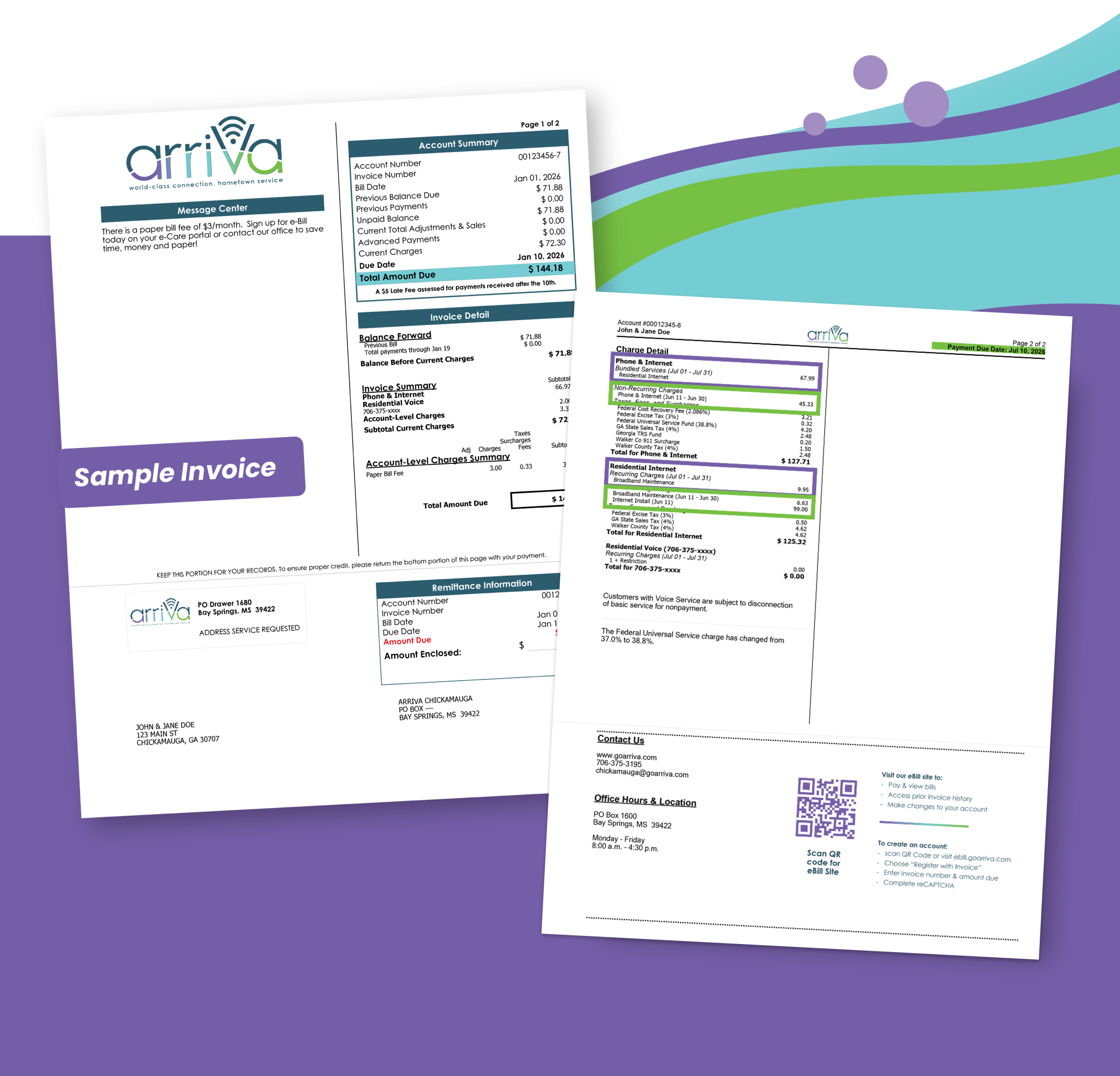
It’s common for your first invoice to be higher than your regular monthly payment because it may include both prorated charges and your first full month of service. You could receive an invoice for up to 7 weeks of service. These prorated charges will only appear on your first invoice (or anytime you make changes to your service mid-cycle). After that, your monthly invoice will typically include only your regular monthly service charges, making it much closer to the amount you expect each month. Current Month Charges: The purple boxes show your regular monthly service charges. Arriva bills service in advance, so your invoice includes the upcoming month’s service. For example, your July service is billed on the statement you receive in late June, and payment is due by July 10th. Prorated Charges: The green boxes show any prorated charges from your installation date through the end of that billing month. Since your service started partway through the month, you’re only charged for the days your service was active before your first full month began.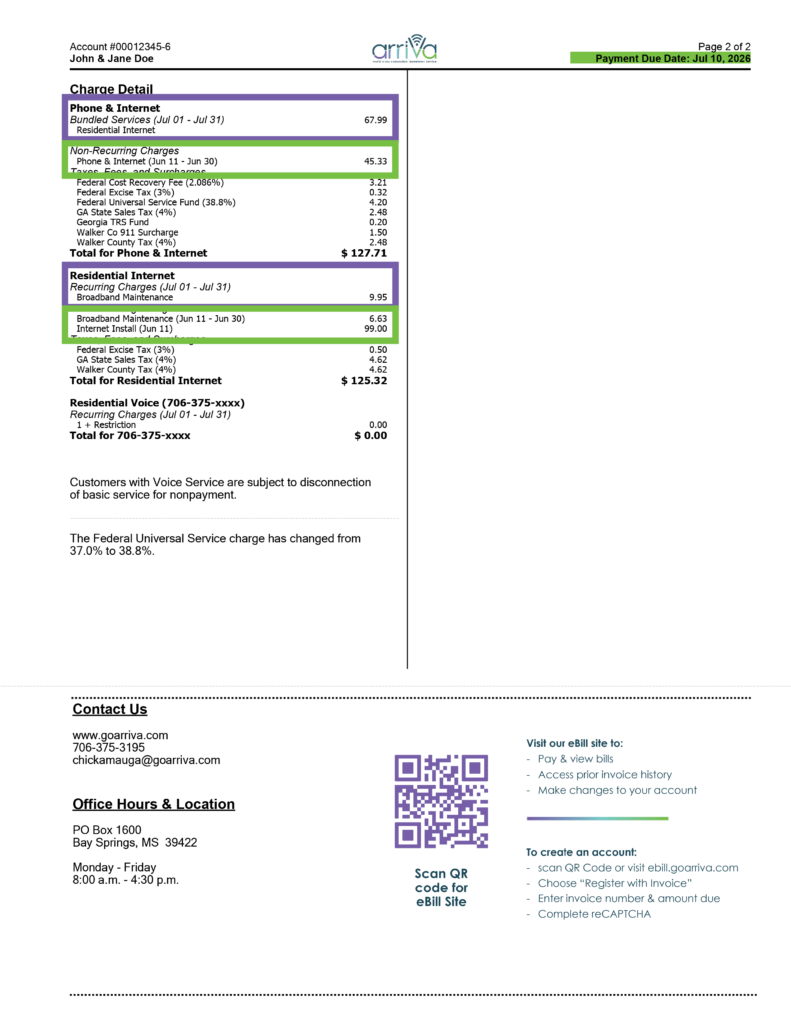 1st of the monthPayment is due
You can pay online at goarriva.com, or by contacting our office.
10thof the monthLate fee appliesIf payment is not received by 11:59 p.m. local time.
17thof the monthInvoices are processedServices are billed one month in advance, and usage-based services like long distance are billed in arrears.
27thof the monthDisconnectDisconnect for nonpay; reconnect fee applies.
Your questions answered
FAQ's
Why is my first invoice higher than expected and what are pro-rated charges?
It’s common for your first invoice to be higher than your regular monthly invoice because it may include both prorated charges and your first full month of service. Prorated charges cover the number of service days between your install date and the end of that month. You may be looking at more than 1 month’s billing amount (see sample invoice above). Your subsequent invoices will not be as high as your first one, unless you have charges for long distance, service calls, late fees, reconnect fees, or other charges.Will every invoice be this amount?
No. After your first invoice, your regular monthly invoice should reflect one month of service unless you have charges for long distance, service calls, late fees, reconnect fees, or other charges.When is my payment due?
Payment is due on the 1st of each month.
When do late fees apply?
Late fees apply on the 10th of the month, or the next business day if the 10th falls on a weekend or holiday.
How can I lower my monthly Arriva invoice?
Arriva participates in the federal Lifeline program, which provides eligible low-income households with a monthly discount on qualifying communications services. Eligible customers may receive a monthly Lifeline benefit of up to $9.25/mo. toward qualifying broadband service, or up to $5.25/mo. toward voice service (amounts correct and up to date as of July 1, 2026. Verify benefit amount on official Lifeline Website). Only one Lifeline benefit is available per household. To apply, visit www.LifelineSupport.org or call 1-800-234-9473. Eligibility is determined through the National Verifier, which is administered by the Universal Service Administrative Company (USAC) on behalf of the Federal Communications Commission (FCC). Once your Lifeline application is approved, contact Arriva to have your benefit applied to your qualifying service.
How do I set up autopay?
Log in to your Arriva online account, click “Auto Pay,” and follow the prompts.
Follow Us on Social Media
Facebook InstagramYou ask, we answer
We’re here to help with account setup, autopay, and notifications.
Contact UsFor more information, visit our FAQs page